
【Linux探索学习】第二十二弹——用户缓冲区:系统如何更好的控制数据交互
linux学习笔记:
https://blog.csdn.net/2301_80220607/category_12805278.html?spm=1001.2014.3001.5482
前言:
我们讲解的重点会放在讲解什么是缓冲区上,对于缓冲区存在的作用和种类等方面上了解一下就行
一、什么是缓冲区?我们通过几个场景来揭露这个问题,首先我们先来看下面这串代码及其输出结果:
代码语言:j*ascript代码运行次数:0运行复制#include<stdio.h>#include<string.h>#include<unistd.h> int main() { const char *fstr="hello fwrite\n"; const char *str="hello write\n"; //C语言接口 printf("hello printf\n"); //stdout -> 1 fprintf(stdout,"hello fprintf\n"); //stdout -> 1 fwrite(fstr,strlen(fstr),1,stdout); //fread, stdout -> 1 //操作系统提供的系统接口 write(1,str,strlen(str)); return 0; } 运行结果:

我们可以把这个结果输出重定向到指定文件中去
代码语言:j*ascript代码运行次数:0运行复制./myfile>log.txtcat log.txt

但是如果我们在代码段的最后一行加入fork函数来创建子进程,我们就会得到一个不一样的输出结果:
代码语言:j*ascript代码运行次数:0运行复制#include<stdio.h>#include<string.h>#include<unistd.h> int main() { const char *fstr="hello fwrite\n"; const char *str="hello write\n"; //C语言接口 printf("hello printf\n"); //stdout -> 1 fprintf(stdout,"hello fprintf\n"); //stdout -> 1 fwrite(fstr,strlen(fstr),1,stdout); //fread, stdout -> 1 //操作系统提供的系统接口 write(1,str,strlen(str)); fork(); return 0; } 运行结果:

我们发现再次输出重定向时结果发生了很大的改变,调用C语言接口的语句被打印了两遍,而系统调用接口则只被打印一遍,而且顺序也发生了变化,调用系统接口的先被打印
为什么会出现这种情况呢?在解释之前我们先来看下面这种情况:
代码语言:j*ascript代码运行次数:0运行复制#include<stdio.h>#include<string.h>#include<unistd.h> int main() { const char *fstr="hello fwrite\n"; //const char *str=" ;hello write\n"; //C语言接口 printf("hello printf\n"); //stdout -> 1 fprintf(stdout,"hello fprintf\n"); //stdout -> 1 fwrite(fstr,strlen(fstr),1,stdout); //fread, stdout -> 1 close(1); //操作系统提供的系统接口 //write(1,str,strlen(str)); //fork(); return 0; }
  ;hello write\n"; //C语言接口 printf("hello printf\n"); //stdout -> 1 fprintf(stdout,"hello fprintf\n"); //stdout -> 1 fwrite(fstr,strlen(fstr),1,stdout); //fread, stdout -> 1 close(1); //操作系统提供的系统接口 //write(1,str,strlen(str)); //fork(); return 0; }
 我们只留下C语言的几个打印方式,同时在打印执行完后把1号文件关闭了
 灵光
灵光
蚂蚁集团推出的全模态AI助手
 1635
查看详情
1635
查看详情

运行结果:

上面的每一条打印语句我们都通过\n来刷新缓冲区的,如果我们把\n去掉再执行一遍:
代码语言:j*ascript代码运行次数:0运行复制#include<stdio.h>#include<string.h>#include<unistd.h> int main() { const char *fstr="hello fwrite"; //const char *str="hello write\n"; //C语言接口 printf("hello printf"); //stdout -> 1 fprintf(stdout,"hello fprintf"); //stdout -> 1 fwrite(fstr,strlen(fstr),1,stdout); //fread, stdout -> 1 close(1); //操作系统提供的系统接口 //write(1,str,strlen(str)); //fork(); return 0; } 运行结果:

我们发现没有任何输出结果,这又是什么原因呢?注意:是在close(1)关闭和\n去掉同时存在的情况下才有了这样的结果
但是如果我们是对系统接口执行这个操作:
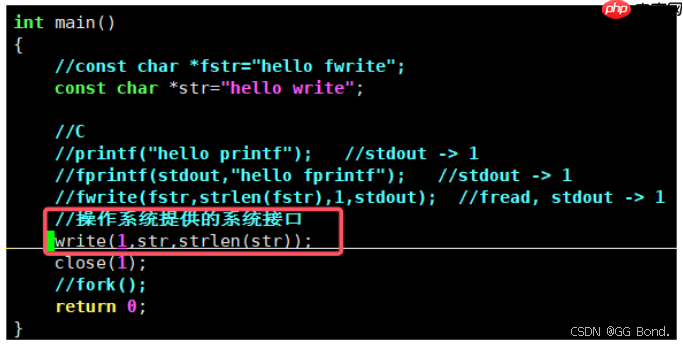
执行结果:

我们发现此时有打印结果
其实原因如下:
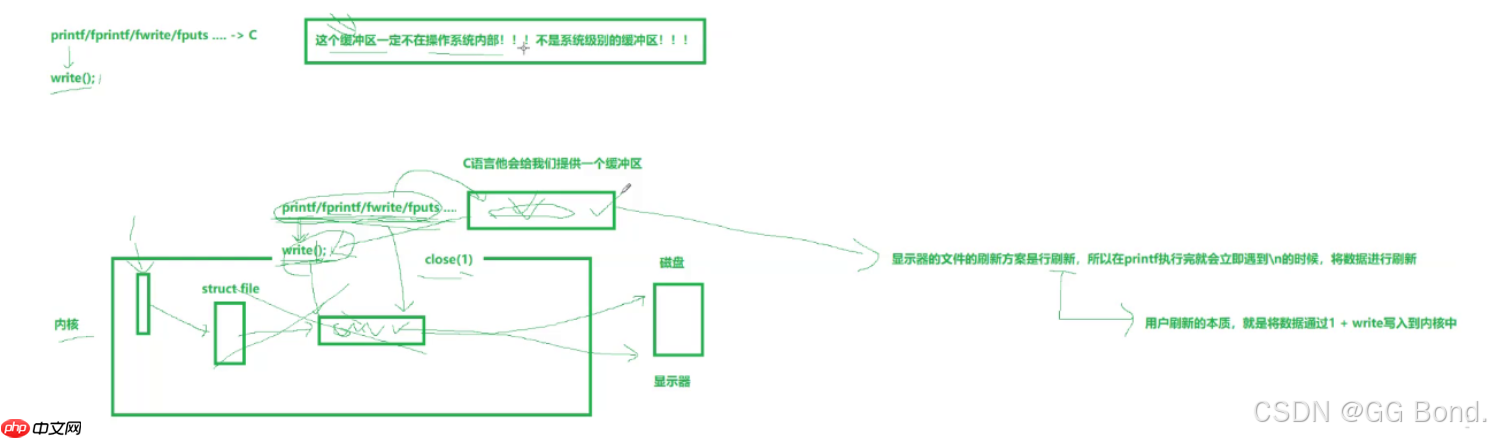
我们对
以上就是【Linux探索学习】第二十二弹——用户缓冲区:系统如何更好的控制数据交互的详细内容,更多请关注其它相关文章!
热门内容推荐






快捷栏目导航







